
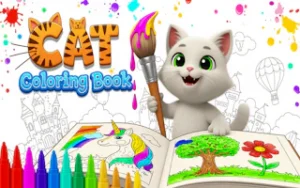



Cat Coloring Book is a calm digital drawing activity built around a collection of cat-themed outlines. Instead of chasing a score or racing against a clock, players can choose a picture, experiment with colors, and refine small details at their own pace. With tools such as a brush, eraser, zoom control, and adjustable brush size, the game gives users plenty of freedom to create their own versions of each illustration.
About the Game
Genre: Coloring and drawing
Objective: Select a cat-themed picture and create a finished drawing by applying colors with the available art tools.
The experience is centered on creative freedom rather than traditional game objectives. Players can browse the available cat outlines, select one, and decide how to color the different sections of the artwork.
The interface also provides practical drawing tools for more controlled coloring. The brush handles the main artwork, while the eraser makes corrections possible. Zooming and changing brush size become useful when working on smaller or more detailed areas.
Controls
Press Play to enter the coloring screen, then select a picture and choose colors from the palette. Use the brush to color, the eraser to remove unwanted marks, zoom to inspect details, and adjust the brush size when more precise control is needed.
Gameplay Details
Starting a drawing is straightforward. After entering the coloring book, players choose an illustration and begin applying colors with the brush. There is no required color scheme described in the source, so the artwork can be approached according to the player’s own preferences.
The drawing tools make experimentation less restrictive. An unwanted section can be removed with the eraser, while zooming provides a closer view when working on small parts of a picture. Adjusting the brush size is particularly useful when switching between broad areas and fine details.
Players can return to the picture selection screen and choose another cat illustration when they want a fresh canvas. Completed artwork can also be saved, giving finished drawings a practical endpoint instead of requiring the player to start over each time.
Tips and Strategies for Cat Coloring Book
- Plan your main colors first: Choosing a basic palette before coloring can help keep the finished cat illustration visually consistent.
- Use different brush sizes: A larger brush is useful for broad sections, while a smaller setting provides better control around detailed areas.
- Zoom in for precision: Enlarging the artwork makes small sections easier to work on without rushing through delicate details.
- Use the eraser for corrections: Mistakes do not have to ruin a drawing, since unwanted coloring can be removed and corrected.
- Save finished artwork: Once a picture is complete, save it before moving to another illustration so the finished design is preserved.
Why Players Enjoy Cat Coloring Book
Cat Coloring Book stands apart from score-driven games by giving players control over the pace of the activity. There is no pressure to finish a picture quickly, which allows more attention to go toward color selection, detail work, and experimentation.
The variety of cat-themed outlines also gives the experience room for repeated creative sessions. A single picture can look very different depending on the colors and drawing choices used, while the collection provides another canvas when players want to try a new idea.
Its strongest feature is the combination of simple controls and useful editing tools. Brush size, zoom, and erasing are small additions, but they make the drawing process more flexible and give players greater control over the final result.
Game Information
- Developer: Not specified in the source.
- Platforms: Browser, Desktop, Mobile, and Tablet.
- Release Date: July 18, 2025.
- Last Update: July 29, 2026.
- Languages: Not specified in the source.
- Game Type: Coloring and drawing.
Conclusion
Cat Coloring Book provides a straightforward space for drawing and experimenting with color without competitive pressure. Cat Coloring Book is especially suited to players who prefer a slower creative activity, with zoom, brush sizing, and erasing adding useful control. Choose a cat outline, build your palette, refine the details, and save the finished artwork.


Leave a Reply