




Introduction
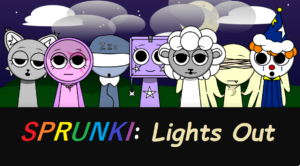
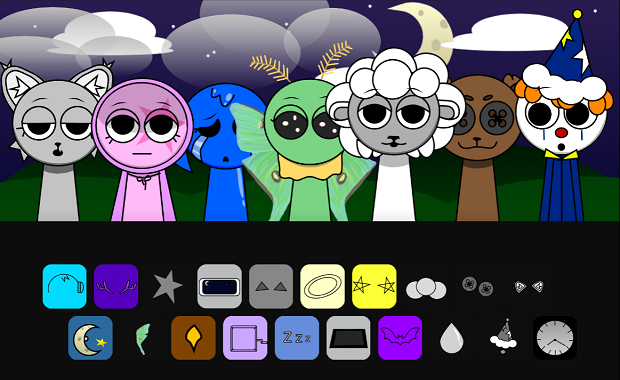
Sprunki: Lights Out gives music creation a calm nighttime makeover, placing its sleepy performers beneath a star-filled sky. Seven characters wait quietly in a row, each ready to become part of your next composition. Their relaxed expressions and dreamlike surroundings create a peaceful setting, but the mood can change quickly. With the right sound choices, the quiet scene can turn into something much stranger.
About Sprunki: Lights Out
This casual music game uses character-based sound mixing as its main mechanic. Your objective is to create a soundtrack by assigning different music icons to the sleepy characters. Each addition changes the composition, allowing you to build a combination that suits the atmosphere.
The nighttime presentation is a major part of the experience. The characters initially appear tired and peaceful, but adding sounds causes them to change their appearance and perform. A special Horror mode can also be activated through the clock icon, shifting the relaxing scene toward eerie visuals and unsettling audio.
How to Play
The controls are based on simple drag-and-drop interaction. Sound icons appear along the bottom of the screen, and you can drag them onto the characters to add their musical parts. Experiment with different assignments and listen to how each new layer changes the track.
- Select a music icon from the available choices.
- Drag the icon onto one of the characters.
- Listen as the character joins the composition.
- Try different sound combinations to shape the soundtrack.
- Use the clock icon when you want to activate the darker Horror mode.
Game Features
- A dreamy nighttime setting with a moonlit, starry backdrop.
- Seven sleepy humanoid characters serve as the musical performers.
- Drag-and-drop controls make sound mixing quick to understand.
- Character appearances change as musical elements are assigned.
- A Horror mode introduces creepy graphics and eerie sounds.
Tips for Better Mixes
- Build your track gradually: Add a few sounds first and listen before introducing additional layers.
- Try every character: Moving an icon to a different performer can change the overall feel of the composition.
- Keep the mix balanced: Too many competing sounds can make individual elements harder to notice.
- Experiment with the clock: Activate Horror mode after exploring the normal atmosphere to hear how dramatically the mood changes.
Similar Games
- Sprunki SprunkBricks: A creative Sprunki-themed experience with a different visual style and playful presentation.
- The Jolly of Sprunki: Another character-based Sprunki game offering a different musical atmosphere.
- Sprunki Greencore: A darker music creation experience focused on eerie sounds and nature-inspired visuals.
Conclusion
Sprunki: Lights Out combines relaxing nighttime visuals with flexible sound mixing and an unexpected horror twist. Start with the peaceful moonlit stage, experiment with the sleepy performers, and gradually build your own soundtrack. When you want a darker atmosphere, the clock icon provides a simple way to transform the experience.



Leave a Reply